



Xiaomi Robot Vacuum H50
VAT included.
In stock
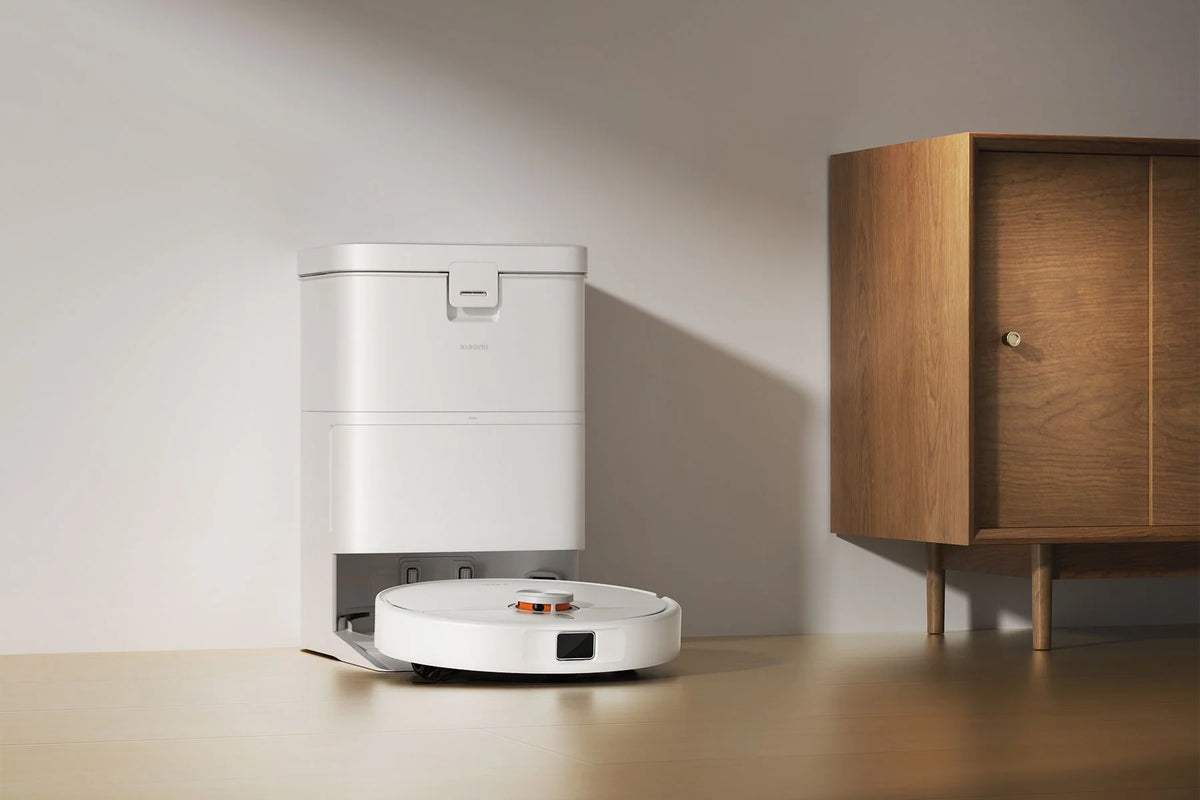
The Xiaomi Robot Vacuum H50 is a robot vacuum with a mopping function and a station that takes care of the maintenance for you. A laser on top scans your home all around and puts the floor plan into the Xiaomi Home app. There you choose for each run whether the robot vacuums, mops, or first vacuums and then mops.
With 10,000 Pa of suction power, crumbs, sand and cat litter all get picked up. Hair doesn't get wrapped around the brushes, thanks to the Y-shaped comb teeth on the main brush. Mopping is done with two round mops that spin across the floor at 180 revolutions per minute. On rugs you mark out in the app, they lift up 10 mm.
After every run, the station soaks and scrubs the mops, and then dries them with air. That keeps them fresh and prevents any musty smell. The dust goes into a bag that lasts up to 75 days. The 4-liter clean water tank is enough for mopping up to 240 m².

Your payment details are processed securely. We do not store credit card information and have no access to this data.
Share This Product


A tour around your home
From the first scan to the wash cycle in the station.

The floor plan first
On its first run, the laser scans your entire home. After that, the floor plan appears in the app, with rooms you can name yourself.

Vacuum and mop in a single pass
With 10,000 Pa, crumbs and sand are a thing of the past. Two mop pads follow behind, spinning at 180 revolutions per minute.

The rug in the living room
Mark your rugs in the app, and the mop pads will lift 10 mm higher there. Your carpet stays dry and gets extra suction power.

Back to the station
There the mops are soaked, scrubbed and dried. The dust goes into a bag that lasts up to 75 days.

Does the Xiaomi Robot Vacuum H50 fit your situation?
A great choice if:
- you're looking for a robot that both vacuums and mops, with a station that handles the maintenance
- you mostly have hard floors, with the occasional rug
- there's a dog or cat around that sheds hair
- the thresholds in your home aren't higher than 2 cm
Less suitable if:
- there are often toys, socks or cables on the floor. The H50 doesn't have an obstacle sensor, but the Xiaomi Robot Vacuum H50 Pro does see them coming
- you have lots of corners and baseboards where dirt builds up. The H50 Pro extends its side brush and mop arm all the way to the edge
Torn between the H50 and the H50 Pro? Further down you can see them side by side.

Crumbs, sand and hairs in a single pass
With 10,000 Pa of suction power, the Xiaomi Robot Vacuum H50 picks up daily dirt off your floors. Crumbs under the dining table, sand by the front door and litter granules next to the box. On hard floors, the robot picks up more than 99% of coarse particles like rice, according to Xiaomi.
On carpet, the suction power increases when you turn on carpet boost in the app. That way, dust that has been trodden into the fibers of the rug comes out too, not just what's lying on top.
Want it quieter? Then choose a lower suction mode for the daily round and save the highest setting for the big clean. You set that in the Xiaomi Home app.

Two rotating mopping pads instead of a cloth
Underneath the robot are two round mopping pads that spin across the floor at 180 revolutions per minute. It works just like scrubbing by hand, and even removes dried-on footprints and coffee stains.
You decide how wet the pads get by choosing from three water levels. Laminate and parquet get the lowest setting. Tiles in the kitchen or bathroom can handle a bit more water.
With the vacuum-first, then-mop mode, the robot first makes a room completely dust-free and only then goes around with the mopping pads. That way you don't push crumbs across the floor.
How does the Xiaomi Robot Vacuum H50 compare?
Two models with the same battery and a station that washes the mops and empties the dust. The H50 Pro has more suction power, spots obstacles coming and extends its side brush and mop arm all the way to the edge.
|
Model
|
Robot Vacuum H50 |
|
|
Suction Power
|
10,000 Pa |
15,000 Pa |
|
Thresholds
|
Up to 2 cm |
Up to 2 cm |
|
Edges and corners
|
Fixed side brush and mopping |
Side brush and mop arm extend out |
|
Mopping
|
2 rotating mop pads, 180 rpm |
2 rotating mopping pads, 180 rpm, arm slides under furniture |
|
Obstacle Detection
|
Laser navigation, no obstacle sensor |
Laser navigation and 129° obstacle sensor |
|
Mop cleaning
|
Washing and drying with air |
Wash and dry with hot air |
|
Dust bag
|
75 days |
75 days |
|
Battery
|
5,200 mAh |
5,200 mAh |


The station does the dirty work
After every job, the H50 drives back to its station. There, the mop pads are first soaked so the dirt loosens, and then scrubbed at high speed over a washboard. The dirty water drains into a separate tank.
After washing, the station dries the mop pads with air. That keeps them fresh and prevents any musty smell. The robot's dustbin is also emptied automatically, into a bag that lasts up to 75 days. Count on about five new bags a year.
The clean and dirty water tanks are both 4 liters. One fill is enough for up to 240 m² of mopping, so even in a larger home you don't have to top up every day. You lift the tanks out from the top.

No more hair wrapped around the brush
With many robots, long hair and dog hair get wrapped around the brush. That's why the main brush of the H50 has Y-shaped comb teeth across its full width. These catch hairs and loosen them before they can wind up.
The side brush has two curved arms that guide hairs toward the suction inlet, instead of holding onto them. Together, that saves you a lot of fiddling with scissors.
The comb guard is removable. Every now and then you take it off, rinse it clean and click it back. The brush doesn't ask for any more maintenance than that.

Over the threshold and onto the mat
A threshold between the hallway and the living room, or the edge of a thick rug: the H50 climbs over height differences of up to 2 cm. That means no getting stuck halfway through a cleaning round.
Mark your rugs as carpet zones in the Xiaomi Home app, and the mops lift up by 10 mm there. The carpet stays dry, and with carpet boost your rug gets extra suction power.
Got high-pile carpet, a rug with fringes or carpet thicker than 8 mm? Then choose carpet avoidance in the app. The robot will leave that rug alone.
How to set up the Xiaomi Robot Vacuum H50
Unpack it, set it down and open the app. Go through these steps once, and the robot gets to know your home and understands what matters to you.
Step 1: place the station in a fixed spot
Step 1: place the station in a fixed spot
Choose a spot against a straight wall, with open space in front of and beside the dock. This makes it easy for the robot to drive in and out. Connect the dock, fill the clean water tank and let the robot charge fully before its first run.
Step 2: connect the robot to the Xiaomi Home app
Step 2: connect the robot to the Xiaomi Home app
Download the Xiaomi Home app, log in and add the robot. You do all the settings below in that app. Afterwards, you can also control the robot with Google Assistant or Amazon Alexa.
Step 3: let it do a mapping run
Step 3: let it do a mapping run
Open the interior doors and clear away loose cables, socks and toys. The H50 doesn't have an obstacle sensor, so anything on the floor could get caught up. Then let the robot explore the whole house once.
Step 4: mark your rugs as a carpet zone
Step 4: mark your rugs as a carpet zone
After the first run, your rooms appear on the map. Draw your rugs in there as a carpet zone. Only then does the robot know where to lift the mopping pads. Switch on carpet boost right away for extra suction power on the rug.
Step 5: Choose the mode and the water level
Step 5: Choose the mode and the water level
For your daily routine, vacuuming first and then mopping works best. Set the water level low on parquet and laminate, and one level higher on tiles. Draw no-go zones around your pet's food bowl or a cabinet with loose cables.
Step 6: set up a fixed schedule
Step 6: set up a fixed schedule
Let the robot run while you're out, for example every weekday at 10:00. When you get home, the floor is clean and the mop has already been washed. You can set up a separate schedule for each room.
Step 7: the maintenance that remains
Step 7: the maintenance that remains
Top up the clean water tank now and then and empty the dirty water tank. About every 75 days you'll replace the dust bag with a new one. In between, give the main brush's comb guard a quick rinse.

Your home mapped out, the robot on your phone
On top of the H50 spins a laser that scans your home 360 degrees all around. After the first run, a floor plan appears in the app and the robot plans its own route, lane by lane. Live on multiple floors? It saves a separate map for each level.
In the Xiaomi Home app, you set schedules, draw no-go zones and pick from four modes: vacuuming, mopping, both at once, or vacuum first and then mop. Tap the couch or dining table on the map, and the robot cleans just around them.
If the 5,200 mAh battery runs low halfway through, the robot recharges and then picks up right where it left off. You can also control it with your voice, via Google Assistant or Amazon Alexa.
Service just as important as the product
We think service matters just as much as the product itself. Our customer service team knows every product inside and out and has tested them personally, so you always get honest, expert advice. We also run our warehouse entirely in-house.
Everything happens under our own roof. That way we keep a firm grip on quality and get your order to you quickly and carefully.
Order before 8:00 PM on a business day and if the product is in stock, you'll have it the next business day in the Netherlands and Belgium.
Why choose TechPunt?

Free shipping
All orders over €75 are delivered to your home at no extra cost.

Easy Returns
Enjoy the freedom of worry-free shopping thanks to our simple return policy.

Expert Advice
Our team tests every product themselves, so you always get honest and independent advice.
FAQ about the Xiaomi Robot Vacuum H50
Everything you want to know before you order. Can't find your question here? Our customer service is happy to help you.
How high are the thresholds the Xiaomi Robot Vacuum H50 can climb over?
How high are the thresholds the Xiaomi Robot Vacuum H50 can climb over?
Height differences up to 2 cm, such as a threshold or the edge of a rug. If you have higher thresholds, the robot will get stuck there. By setting a no-go zone in the app, you can prevent it from even trying.
What is the difference between the Xiaomi Robot Vacuum H50 and the H50 Pro?
What is the difference between the Xiaomi Robot Vacuum H50 and the H50 Pro?
The H50 Pro vacuums at 15,000 Pa instead of 10,000 Pa. It has two robot arms that extend the side brush and a mop into corners and under furniture, a 129° obstacle sensor and a station that dries with hot air. The battery, dust bag and laser navigation are the same.
Does the Xiaomi Robot Vacuum H50 have a camera?
Does the Xiaomi Robot Vacuum H50 have a camera?
No. The robot navigates with a laser on top and has no camera or obstacle sensor at the front. So nothing is watching you inside your home. Do clear away socks, cables and toys before a cleaning run, though, because it won't avoid those.
Is the Xiaomi Robot Vacuum H50 suitable for pets?
Is the Xiaomi Robot Vacuum H50 suitable for pets?
Yes. The main brush and side brush are designed to prevent hair from tangling, and with 10,000 Pa it picks up cat litter too. Since the H50 doesn't have an obstacle sensor, you'll want to clean up any pet accidents yourself first.
Does my carpet get wet when the H50 mops?
Does my carpet get wet when the H50 mops?
Not if you mark the rug as a carpet zone in the app. The mops lift 10 mm there. For high-pile carpet or carpet thicker than 8 mm, choose carpet avoidance.
How often should you replace the dust bag?
How often should you replace the dust bag?
The dust bag lasts up to 75 days, so about five times a year. Other than that, you top up the 4-litre clean water tank now and then and empty the dirty water tank. The station washes and dries the mops all by itself.
How big can my house be for the Xiaomi Robot Vacuum H50?
How big can my house be for the Xiaomi Robot Vacuum H50?
One tank of clean water is enough to mop up to 240 m². If the 5,200 mAh battery runs out halfway through, the robot recharges and picks up right where it left off. Living across multiple floors? It saves a separate map for each level.
Can you control the Xiaomi Robot Vacuum H50 with your voice?
Can you control the Xiaomi Robot Vacuum H50 with your voice?
Yes, via Google Assistant or Amazon Alexa. You'll need a device with one of those assistants, though. Beyond that, you simply control the robot through the Xiaomi Home app.


